Your knowledge.
One place to ask.
Pay once.
Search your files, notes, tasks and saved articles from one desktop palette. Fifteen sources. Answers with citations. Run AI locally or choose a cloud provider with your own key.
No credit card or email required. Installs in seconds.
Stop Digging. Start Asking.
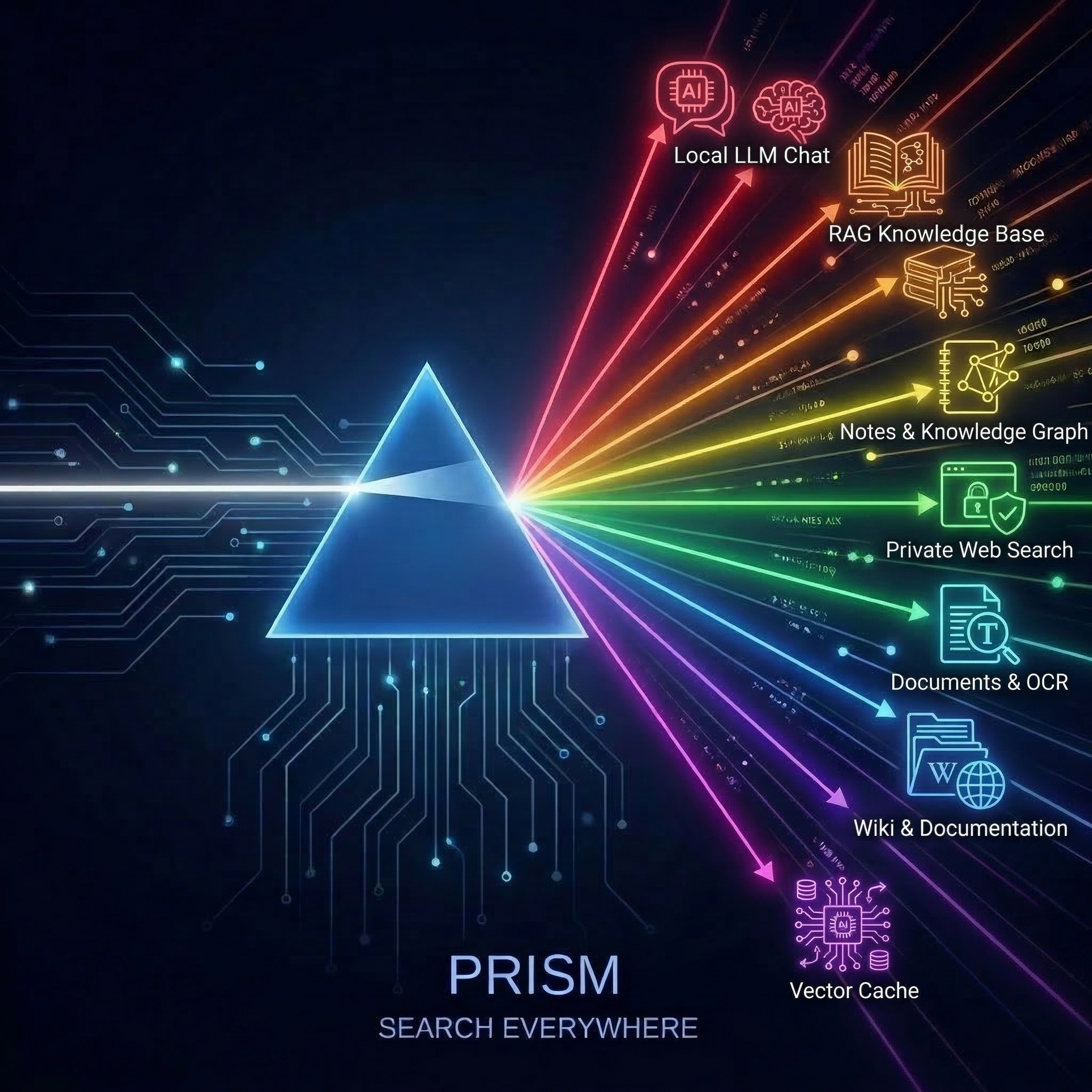
Search the sources you enable, then use Ask to work through the results. Answers draw on readable document passages, with citations that take you back to the source.
Semantic search over documents you explicitly sync to your Qdrant index
Optional indexScanned documents, receipts, PDFs with full OCR text
LiveWiki pages, shelves, chapters — your documentation hub
LiveMarkdown notes, daily journals, knowledge graph links
LiveSearXNG — private web results without tracking
LiveSearch approved local folders, with scheduled refresh for changed files
LiveGmail, Microsoft 365 and FastMail search — find messages without leaving the palette
LiveFile search on your Nextcloud server
LiveFifteen search sources, plus LM Studio for local AI. Cloud AI providers are optional. Foundation supports five enabled search sources; Professional supports all fifteen.
Find it. Ask about it. Keep the source.
Search and Ask share the sources you enable. Read the evidence, follow the citation and keep useful conversations on your machine.
Universal Search
Search across fifteen supported sources, including Linear, ClickUp and Karakeep. Each result retains its source name and a link back to the original.
Local or Cloud, Your Call
Use LM Studio or an OpenAI-compatible server, or bring a key for Claude or GPT. Selecting a cloud model sends your prompt and the retrieved passages to that provider.
Ask with context
Follow up with “summarize those” without restating the topic. Ask retrieves through currently enabled sources, uses readable passages and saves citations with the conversation.
Take Your Answers With You
Export any summary or AI answer to Markdown, PDF or Word — grouped by source with links intact. Or copy a clean summary or the full reference list in a single click.
Smart Prompts
Type / to browse categorized prompt templates for coding, writing, analysis, and more. Skip the blank-page problem and get to work faster.
Always One Keystroke Away
Press Ctrl+Alt+Space (Windows/Linux) or Cmd+Option+Space (macOS) to summon Prism over any app. No window switching, no browser tabs. Your AI command center appears instantly, right where you’re working.
Your Knowledge, Organized
Save useful conversations with their citations and pin results for later. Search history stays in local storage. Approved folders can refresh on a schedule as files change.
Deep Integrations
Enterprise can deliver search, chat and OCR events to configured HTTP endpoints. API access and webhook delivery follow the active license and settings.
Local by default. Connected by choice.
Use local files and a local model to keep document processing on your machine. Connected services receive the searches you send them. Optional cloud AI receives your prompt and supporting passages; optional remote indexing sends content to the destination you configure. Prism has no usage telemetry.
- No telemetry or usage analytics — ever
- Local AI is available without a cloud model account
- No tracking pixels, no fingerprinting, no cookies
- Local file search and a running local model work offline
- History and settings stay local; API keys use the OS keychain
- Built on Tauri 2 and Rust for macOS, Windows and Linux
New connectors start disabled. Choose each source explicitly and remove remote indexes through Settings when you no longer want them. The app also checks for software updates. Read the privacy policy for storage and network details.
Less clutter. More room to think.
A quieter palette puts your query first. Source settings and conversation controls appear where you need them.
A focused palette
One compact footer, fewer status indicators and useful name matches as you type. Search and Ask stay in the mode you choose.
Sources on your terms
Manage active sources in one place. Open a source to configure it, add another when needed and keep index maintenance tucked away.
Clearer conversations
Find past conversations, stop an answer in progress and jump to the latest response. Earlier search results collapse to leave more room for answers.
Lighter Than a Browser Tab
Engineered natively in Rust — a compiled binary, not a browser in a costume. Summon it, read it, dismiss it. AI that stays out of your way until you ask.
Version 1.7.1 · 30-day free trial. No credit card required. No Prism account needed.
Pay Once. Own It Forever.
Foundation and Professional are one purchase: a licence that never expires, with 12 months of free updates. No subscription. Enterprise is a straightforward annual per-seat contract. Own your software again.
LAUNCH50 takes 50% off Foundation and Professional. The prices below are what checkout charges with the code.
- Up to 5 search sources
- Private local AI chat
- Full-text & semantic search
- Community support
- All 15 search sources
- AI answers grounded in your search results
- Bring your own cloud AI keys
- Priority email support
- Everything in Professional
- API server & webhooks
- Deployment templates with enforced audit logging
- Full audit trail export
- Priority support & onboarding
Your Workday Deserves Better.
Bring your notes, tasks and documents into one place to search. Start with local files and connect the services you use.
Get launch pricing
Drop your email. 50% off through October 31, 20% off after.
Coupon:
GitHub · Duncan Smith · Blog